
Halo sobat Webhozz bagaimana kabarnya? semoga selalu diberikan kesehatan, amiiin.
kali ini kita akan mempelajari cara membuat form dengan datepicker.
langsung saja kita tulisankan kode seperti di bawah ini di activity main.xml
<?xml version="1.0" encoding="utf-8"?>
<LinearLayout
    xmlns:android="http://schemas.android.com/apk/res/android"
    xmlns:tools="http://schemas.android.com/tools"
    android:layout_width="match_parent"
    android:layout_height="match_parent"
    tools:context="com.example.webhozzsby.datepicker.MainActivity">

    <LinearLayout
        android:layout_width="match_parent"
        android:layout_height="match_parent"
        android:orientation="vertical">

        <LinearLayout
            android:layout_width="match_parent"
            android:layout_height="wrap_content"
            android:background="#e7e">

            <TextView
                android:layout_width="match_parent"
                android:layout_height="wrap_content"
                android:layout_marginBottom="10dp"
                android:layout_marginTop="10dp"
                android:text="BAGIAN HEADER"
                android:textAlignment="center"
                android:textColor="#fff"
                android:textStyle="bold" />
        </LinearLayout>

        <ScrollView
            android:layout_width="match_parent"
            android:layout_height="match_parent">
            <LinearLayout
                android:layout_width="match_parent"
                android:layout_height="wrap_content"
                android:layout_marginLeft="5dp"
                android:layout_marginRight="5dp"
                android:orientation="vertical">

                <TextView
                    android:layout_width="match_parent"
                    android:layout_height="wrap_content"
                    android:text="NPM\t\t:" />

                <EditText
                    android:id="@+id/isinpm"
                    android:layout_width="match_parent"
                    android:layout_height="wrap_content"
                    android:hint="Masukan NPM" />

                <TextView
                    android:layout_width="match_parent"
                    android:layout_height="wrap_content"
                    android:text="Nama\t\t:" />

                <EditText
                    android:id="@+id/isinama"
                    android:layout_width="match_parent"
                    android:layout_height="wrap_content"
                    android:hint="Masukan Nama" />

                <TextView
                    android:layout_width="match_parent"
                    android:layout_height="wrap_content"
                    android:text="Jenis Kelamin\t:" />
                <RadioGroup
                    android:layout_width="match_parent"
                    android:id="@+id/jk"
                    android:layout_height="wrap_content">
                    <RadioButton
                        android:layout_width="wrap_content"
                        android:layout_height="wrap_content"
                        android:text="Laki - laki" />

                    <RadioButton
                        android:layout_width="wrap_content"
                        android:layout_height="wrap_content"
                        android:text="Perempuan" />
                </RadioGroup>

                <TextView
                    android:layout_width="match_parent"
                    android:layout_height="wrap_content"
                    android:text="Tempat Lahir\t:" />

                <EditText
                    android:id="@+id/tempatlahir"
                    android:layout_width="wrap_content"
                    android:layout_height="wrap_content"
                    android:text=""
                    android:hint="Masukan Tempat Lahir" />
                <TextView
                    android:layout_width="match_parent"
                    android:layout_height="wrap_content"
                    android:text="Tanggal Lahir\t:" />

                <EditText
                    android:id="@+id/tv_dateresult"
                    android:layout_width="wrap_content"
                    android:text=""
                    android:layout_height="wrap_content"
                    android:hint="dd/MM/yyyy" />

                <Button
                    android:id="@+id/simpan"
                    android:layout_width="match_parent"
                    android:layout_height="wrap_content"
                    android:text="SIMPAN" />

                <TextView
                    android:layout_width="match_parent"
                    android:layout_height="wrap_content"
                    android:text="===== HASIL INPUT ====="
                    android:textAlignment="center" />
                <TextView
                    android:id="@+id/hasil"
                    android:layout_width="match_parent"
                    android:layout_height="wrap_content"
                    android:text=""/>
            </LinearLayout>
        </ScrollView>
    </LinearLayout>
</LinearLayout>
Setelah itu kita menuliskan MainActivity seperti di bawah ini.
package com.example.webhozzsby.datepicker;

import android.app.DatePickerDialog;
import android.support.v7.app.AppCompatActivity;
import android.os.Bundle;
import android.view.View;
import android.widget.Button;
import android.widget.DatePicker;
import android.widget.EditText;
import android.widget.RadioButton;
import android.widget.RadioGroup;
import android.widget.TextView;

import java.text.SimpleDateFormat;
import java.util.Calendar;
import java.util.Locale;

public class MainActivity extends AppCompatActivity {

    private DatePickerDialog datePickerDialog;
    private SimpleDateFormat dateFormatter;
    private TextView tvDateResult;
    private EditText btDatePicker;

    Button bsimpan;
    EditText enpm, enama, etempatlahir;
    TextView thasil;
    RadioGroup rgjk;

    private void showDateDialog(){
        Calendar newCalendar = Calendar.getInstance();
        datePickerDialog = new DatePickerDialog(this, new DatePickerDialog.OnDateSetListener() {

            @Override
            public void onDateSet(DatePicker view, int year, int monthOfYear, int dayOfMonth) {

                Calendar newDate = Calendar.getInstance();
                newDate.set(year, monthOfYear, dayOfMonth);

                tvDateResult.setText(dateFormatter.format(newDate.getTime()));
            }

        },newCalendar.get(Calendar.YEAR), newCalendar.get(Calendar.MONTH), newCalendar.get(Calendar.DAY_OF_MONTH));

        datePickerDialog.show();
    }

    @Override
    protected void onCreate(Bundle savedInstanceState) {
        super.onCreate(savedInstanceState);
        setContentView(R.layout.activity_main);

        // inisialisasi
        dateFormatter = new SimpleDateFormat("dd-MM-yyyy", Locale.US);
        tvDateResult = (TextView) findViewById(R.id.tv_dateresult);
        btDatePicker = (EditText) findViewById(R.id.tv_dateresult);

        bsimpan = (Button) findViewById(R.id.simpan);
        enpm = (EditText) findViewById(R.id.isinpm);
        enama = (EditText) findViewById(R.id.isinama);
        thasil = (TextView) findViewById(R.id.hasil);
        rgjk = (RadioGroup) findViewById(R.id.jk);
        etempatlahir = (EditText) findViewById(R.id.tempatlahir);

        bsimpan.setOnClickListener(new View.OnClickListener() {
            @Override
            public void onClick(View v) {
                String inputnpm = String.valueOf(enpm.getText().toString());
                String inputnama = String.valueOf(enama.getText().toString());
                String inputtempatlahir = String.valueOf(etempatlahir.getText().toString());
                String inputotomatis = String.valueOf(tvDateResult.getText().toString());

                int gender = rgjk.getCheckedRadioButtonId();
                RadioButton jk = (RadioButton) findViewById(gender);
                String inputjk = String.valueOf(jk.getText().toString());

                thasil.setText("\n" + "NPM\t\t\t\t\t\t\t\t\t\t\t: " + inputnpm + "\n" +
                        "Nama\t\t\t\t\t\t\t\t\t\t: " + inputnama + "\n" +
                        "Jenis Kelamin\t\t: " + inputjk + "\n" +
                        "Jenis Kelamin\t\t: " + inputtempatlahir + "\n" +
                        "Tanggal Lahir\t\t\t: " + inputotomatis + "\n");
            }
        });

        dateFormatter = new SimpleDateFormat("dd-MM-yyyy", Locale.US);
        tvDateResult = (TextView) findViewById(R.id.tv_dateresult);
        btDatePicker = (EditText) findViewById(R.id.tv_dateresult);
        btDatePicker.setOnClickListener(new View.OnClickListener() {
            @Override
            public void onClick(View view) {
                showDateDialog();
            }
        });
    }
}
Berikut hasilnya
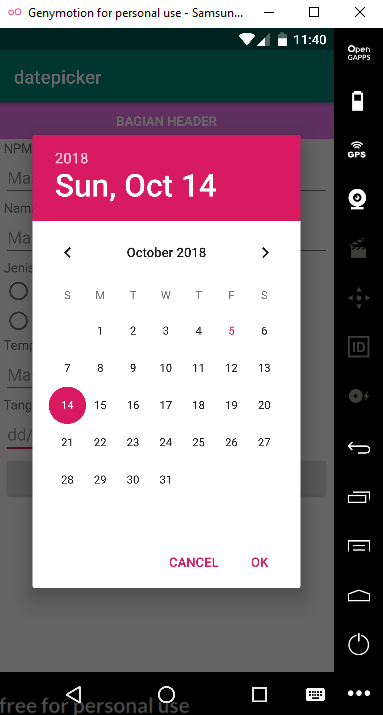
Gimana sobat mudahkan ?
Sobat WebHozz juga bisa mengeksplore sendiri di dalam formnya itu tanpa harus terpaku pada kodingan itu.
Semoga ini bermanfaat bagi sobat sekalian.